The Rx menu of the Precsription window provides additional access and control regarding prescription options.
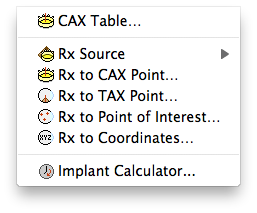
- CAX Table... - opens a window to customize the Central AXis dose table.
- Rx source - Plaque simulator supports up to 4 plaques and 4 tumors per plan. Normally only one is active at any time, but calculations using multiple plaques are possible. Use this hierarchical menu to select which of the plaques or tumors to use when using multiple plaques and prescribing to a plaque or tumor axis point.
- Rx to CAX Point... - opens a dialog in which you select the location on the Central AXis to prescribe to.
- Rx to TAX Point... - opens a dialog in which you select the location on the Tumor AXis to prescribe to.
- Rx to Point of Interest... - opens a dialog in which you select a point of interest to prescribe to.
- Rx to Coordinates... - opens a dialog in which you enter the X,Y,Z coordinates of a point to prescribe to.
- Implant Calculator... - enter prescription and calculate removal time or source strength.