|
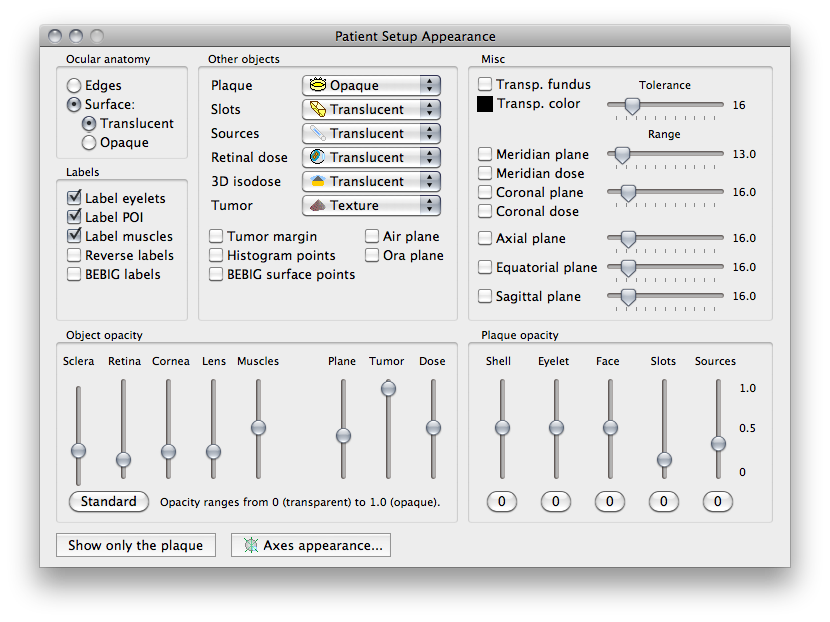
The menus of this group modify the rendering of the plaque, isodose surfaces and tumor.
- Plaque - provides additional control over 3D rendering of the plaque.
- Slots - provides additional control over 3D rendering of the slots in a plaque.
- Sources - provides additional control over 3D rendering of the seeds in a slot.
- Retinal dose - provides additional control over rendering of dose to the retinal surface.
- 3D isodose - provides additional options for 3D rendering of isodose surfaces.
- Tumor - provides additional options regarding the shape and appearance of the tumor.
The buttons of this group enable the 3D display of objects which may be of interest for educational and/or software development purposes.
- Tumor margin - plots the tumor margin.
- Histogram points - plots points used to calculate histograms.
- BEBIG surface points - plots the BEBIG surface points.
- Air plane - shows the air-tissue boundry plane.
- Ora plane - shows a cornal plane through the ora-serrata.
|
 located along the bottom of the Setup window. In this window you can customize the appearance of the model and adjust the opacity settings for many of the components of the 3D model.