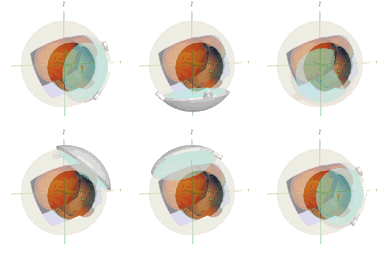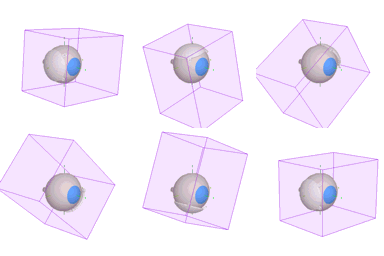
Isodose surface calculations require about 1.4MB of RAM, and can add significantly to dose calculation and 3D rendering time on slower processors. Since isodose surfaces are not necessary for routine treatment planning, the 3D matrix is not created automatically. Before calculating isodose surfaces you must allocate memory for the 3D Matrix by selecting Allocate 3D matrix from the Dosimetry menu or open a plaque file that includes a precalculated 3D matrix.

3DMatrixMovie
Matrix bounds
3DSurfaceMovie
Isodose surface
The 3D matrix bounds are referenced to the coordinate system of the "active" plaque at the time the matrix was created and thus "follow" that plaque. Illustrated to the left are the matrix bounds and the 85 Gy isodose surface of a BEBIG CCB plaque.

The matrix bounds are 20mm lateral to the plaque's central axis (CAX), 5mm behind the plaque, and 40mm in front of the plaque. Dose outside these bounds is assumed to be zero. The 3D matrix is a nonuniform grid. The grid spacing varies between 0.5 and 1.0mm laterally and between 0.25 and 2.0mm in front of (and behind) the plaque with the highest resolution closest to the plaque surface. The matrix data are normalized to a point 2.5 mm in front of the plaque on the CAX. When the matrix is used for isodose calculations, only dose to the normalization point needs to be recalculated to account for implant date and duration.

If a 3D matrix exists, it can be used to accelerate 2D surface calculations. This is particularly useful for plaques with large numbers of sources and constant source distributions such as the BEBIG Ru-106 plaques which are modeled as hundreds of point sources. Since the matrix is normalized, the dose distribution can be "precalculated" once and saved with a plaque. IMPORTANT: if the isotope distribution on a plaque, or the calculation mode (isotropic, point source, etc...) settings are ever changed, the matrix is no longer valid and must be recalculated. It is advisable to "lock" the isotope in plaques with 3D matrices.

To create a plaque with a precalculated 3D matrix:

  1. Create a plaque or open a plaque file from the plaque menu. Use the BEBIG calibration assistant or create an isotope inventory and load isotope into the plaque to establish its isotope distribution and calibration date. Lock the plaque by clicking the Lock button in the Plaque window. It is recommended that you a lock the isotope in plaques with 3D matrices since accidentally changing the loading of a plaque will force you to recalculate the 3D matrix..
  2. Allocate the 3D Matrix by selecting Allocate 3D matrix from the Dosimetry menu.
  3. Set the desired calculation mode (USC, isotropic, point source, shell, etc...) in the Prescription window and then select Calculate 3D Matrix from the Dosimetry menu.
  4. Save the plaque. Bring the Plaque window to the front (if it is not already) by clicking in the window or selecting Plaque from the Window menu. Go to Save As... under the File menu and in the MacOS file navigation dialog set the File type to "Plaque file". For instance, the plaque "CCB 684" might be renamed "CCB 684+3D" to remind you that it has a 3D matrix attached. Plaques with 3D matrices require an additional 1.4MB of disk space and must be compressed to fit on a floppy diskette. Note: The 3D matrix is attached to patient setup files as well, so these files will also require an additional 1.4MB of disk space!

Guide Contents