The Radionuclide menu controls all aspects of the management and selection of radionuclide sources (e.g. I-125 seeds).
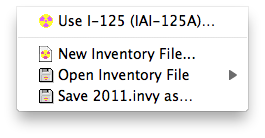
- Use I-125... - opens the radionuclide inventory dialog for the currently selected inventory file and source. If no source or inventory file have yet been selected, preference settings are substituted.
- New Inventory File... - name and create a new, empty, radionuclide inventory file.
- Open Inventory File - open an existing radionuclide inventory file.
- Save XXX.invy as... - save the current inventory file.